---
title: Home
url: 'https://networkreporter.com/'
markdown: 'https://networkreporter.com/index.md'
date: '2026-09-23'
description: 'Eliminate Guesswork,Deploy with Confidence® Uncover performance and operational issues prior to deployment. InterWorking Labs (IWL) specializes in network emulation and protocol testing by providing cutting-edge solutions for a wide variety of applications. By simulating real-world cond…'
taxonomy:
category:
- Searchable
---
# Home

Eliminate Guesswork,
Deploy with Confidence®
Uncover performance and operational issues prior to deployment.
InterWorking Labs (IWL) specializes in network emulation and protocol testing by providing cutting-edge solutions for a wide variety of applications. By simulating real-world conditions, IWL helps organizations eliminate guesswork in deploying products through network testing infrastructures.
IWL’s tools and services are designed to identify and address potential issues before they impact performance. Whether it’s fine-tuning for peak efficiency or preparing for the unexpected, IWL empowers businesses to simulate network conditions head-on.
IWL's products work with actual network traffic, your own real traffic.
### Product Line: KMAX
Our KMAX product line operates at layer two - like an Ethernet bridge. Unlike a typical Ethernet bridge, KMAX can apply controlled impairments to the traffic.
Because KMAX operates at layer two, it requires minimal or no configuration. Think of KMAX as a smart bump inserted into the middle of an Ethernet cable (which, depending on the KMAX model, can be copper or fiber optics.)
Do you want to drop packets or add variable latency? Just dial the desired amounts into KMAX and, voila, your real traffic is now subject to packet drop or variable latency.
KMAX has a whole suite of possible impairments - packet drop, duplication, rate limitation, corruption, fixed and variable delay - each with many options, including "waveforms" that can change those options over time.
Changes to the impairment settings occur immediately.
A bypass mechanism exists so that the user can let packets avoid the impairment machinery; this is useful for quick, ad hoc A:B comparison testing.
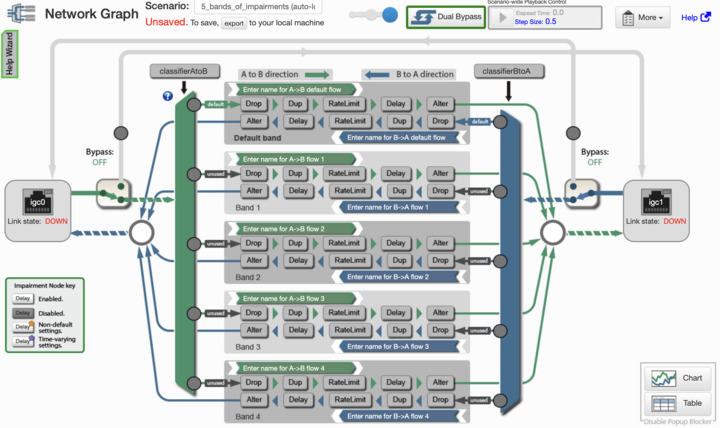
Below is an image of KMAX's "graph" screen; note that there may be several bands/flows of packet traffic, each subject to its own set of impairments (which may be different for each direction of packet movement.)
[](https://networkreporter.com/images/kmax-graph-2582x1536.jpg)
KMAX Impairment Graph Screen
(Click to expand image.)
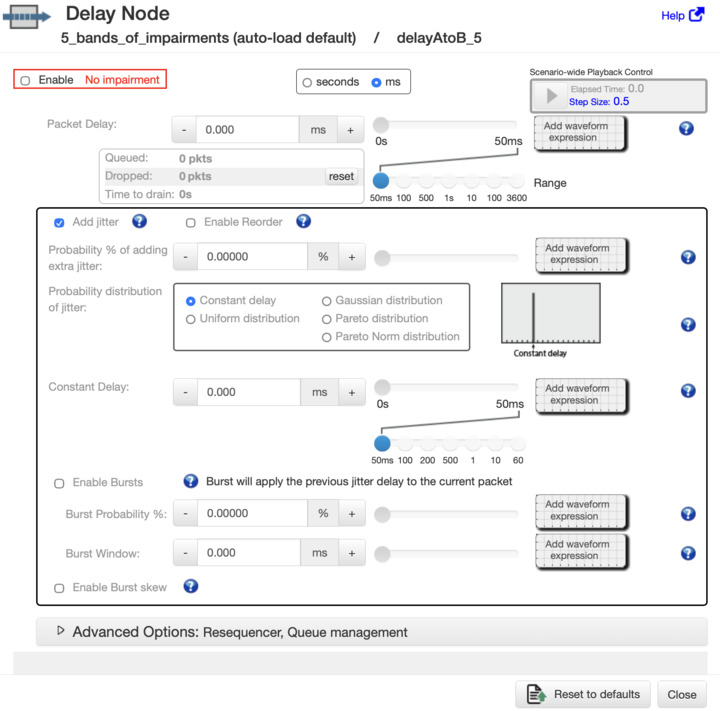
Each of the impairment types has many options; the screen image below shows just a portion of the options available for the delay (fixed and variable latency/jitter) impairment.
[](delay-node-1514-1496.jpg)
KMAX Delay Node Screen
(Click to expand image.)
KMAX is typically operated through a web browser. However, it may also be controlled from programs (in languages such as Python or shell scripts).
KMAX is an evolution of Jon Postel's "flakeway" concept - described in [RFC1025](https://www.rfc-editor.org/info/rfc1025/).
KMAX is a hardware+software platform.
#### Details
All KMAX models share the same functionality, user interfaces, and application programming interfaces (APIs.) For a detailed discussion of KMAX functionality, see page [KMAX Functionality](https://networkreporter.com/products/kmax-functionality).
There are several models of KMAX. See our [Product List page](https://networkreporter.com/products/kmax-product-list) for details.
#### Interested in KMAX?
KMAX is an extensive tool with many features. IWL is happy to discuss your goals and requirements; [please contact us](https://networkreporter.com/contact).
---
Important
Maxwell Pro and SilverCreek are now sourced by [Seguesoft: https://seguesoft.com/](https://seguesoft.com/)
- SilverCreek at:
- Maxwell Pro at:
---
## Navigation
- Next: [Buy](https://networkreporter.com/buy.md)